


API testing has become a core part of modern software development. It allows teams to validate functionality, performance, and reliability much faster than UI testing.
Today, QA teams increasingly rely on automated tools to simplify workflows and improve test coverage.
“Implementing a single framework for UI and API testing is an ideal approach to understand your app end-to-end which also helps in addressing the core issues with respect to quality at the source of the problem.” — Mykhailo Poliarush, CEO Testomat.io
If you want to better understand how it works in practice, this detailed guide on playwright api testing example explains real use cases and step-by-step implementation.
Why Playwright Is Used for API Testing
Playwright is widely known for browser automation, but it also provides powerful capabilities for API testing.
It allows QA engineers to:
- send HTTP requests (GET, POST, PUT, DELETE)
- validate responses and status codes
- integrate API tests into automation workflows
- combine UI and API testing in one framework
This makes it a flexible choice for teams looking to streamline testing processes.
Categorized Overview of API Testing Tools
Below is a structured overview of tools commonly used for API testing in modern QA workflows.
1. Test Management and Reporting: Testomat.io
Testomat.io helps QA teams manage both manual and automated tests in one place.
Instead of replacing tools like Playwright, it connects them into a centralized system.
With Testomat.io, teams can:
- collect API test results
- track execution across environments
- analyze performance and failures
Key Advantages:
- unified dashboard
- CI/CD integration (GitHub, GitLab, Jenkins)
- real-time analytics
Strategic Value:
It provides full visibility into API testing processes, making it easier to scale QA operations.
2. API Automation Framework: Playwright
Playwright is a modern automation framework that supports both UI and API testing.
It enables developers to write tests in JavaScript or TypeScript and execute them quickly.
For example, a typical playwright api testing workflow includes:
- sending a request
- validating response data
- checking authentication and headers
To see how it works step-by-step, check this guide on playwright api testing.
Key Advantages:
- fast execution
- easy setup
- supports multiple environments
Limitations:
- requires basic programming knowledge
- needs integration for reporting
3. API Development and Testing: Postman
Postman is one of the most popular tools for testing APIs manually.
It allows teams to:
- send requests
- inspect responses
- test endpoints quickly
Key Advantages:
- user-friendly interface
- quick debugging
- supports collections and environments
Limitations:
- limited automation capabilities compared to frameworks
4. Performance Testing Tools: Apache JMeter
JMeter is used to test API performance under load.
It helps teams understand how APIs behave with high traffic.
Key Advantages:
- load and stress testing
- detailed metrics
- open-source
Limitations:
- complex setup
- requires experience
How to Choose the Right API Testing Stack
When selecting tools for API testing, focus on three key factors:
1. Scalability
Can the tool handle growing traffic and data?
2. Integration
Does it work with your CI/CD pipeline?
3. Visibility
Does it provide clear reports and insights?
The most effective approach is to combine:
- Playwright for automation
- Postman for quick testing
- JMeter for performance
- Testomat.io for management
Best Practices for Playwright API Testing
To get the best results, QA teams should follow simple but effective practices:
- organize test cases into logical groups
- use clear naming conventions
- validate both status codes and response data
- handle error scenarios
- keep test data up to date
These steps help improve test reliability and reduce maintenance effort.
Final Thoughts
API testing is essential for building stable and scalable software.
Tools like Playwright make it easier to automate testing and validate API behavior quickly.
At the same time, platforms like Testomat.io help teams manage testing processes and gain full visibility into results.
By combining automation, reporting, and best practices, QA teams can significantly improve software quality and speed up development.
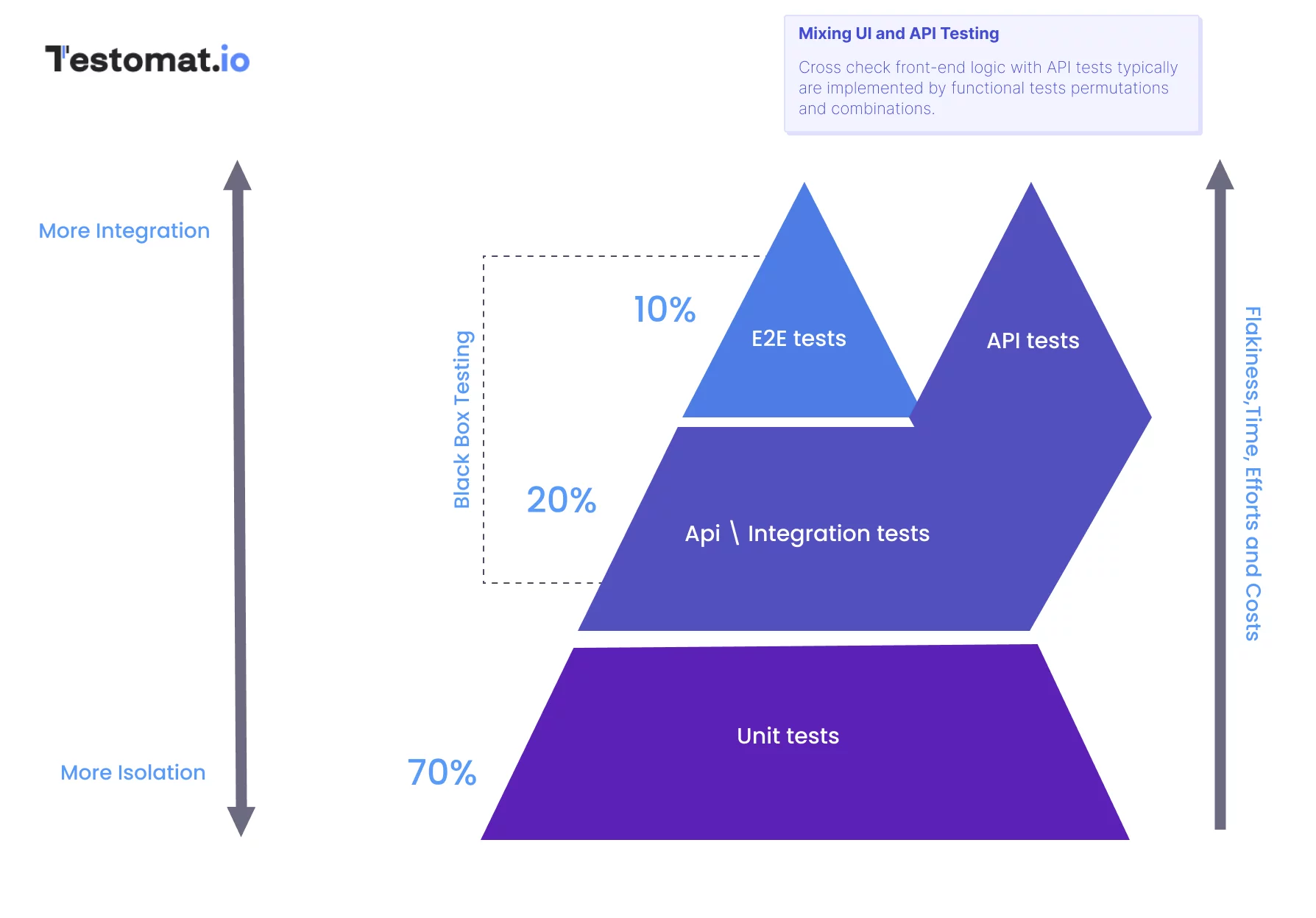
Editor’s Note: The opinions expressed here by the authors are their own, not those of impakter.com — In the Cover Photo: Playwright API Testing Pyramid. Cover Photo Credit: Playwright